
معرفی
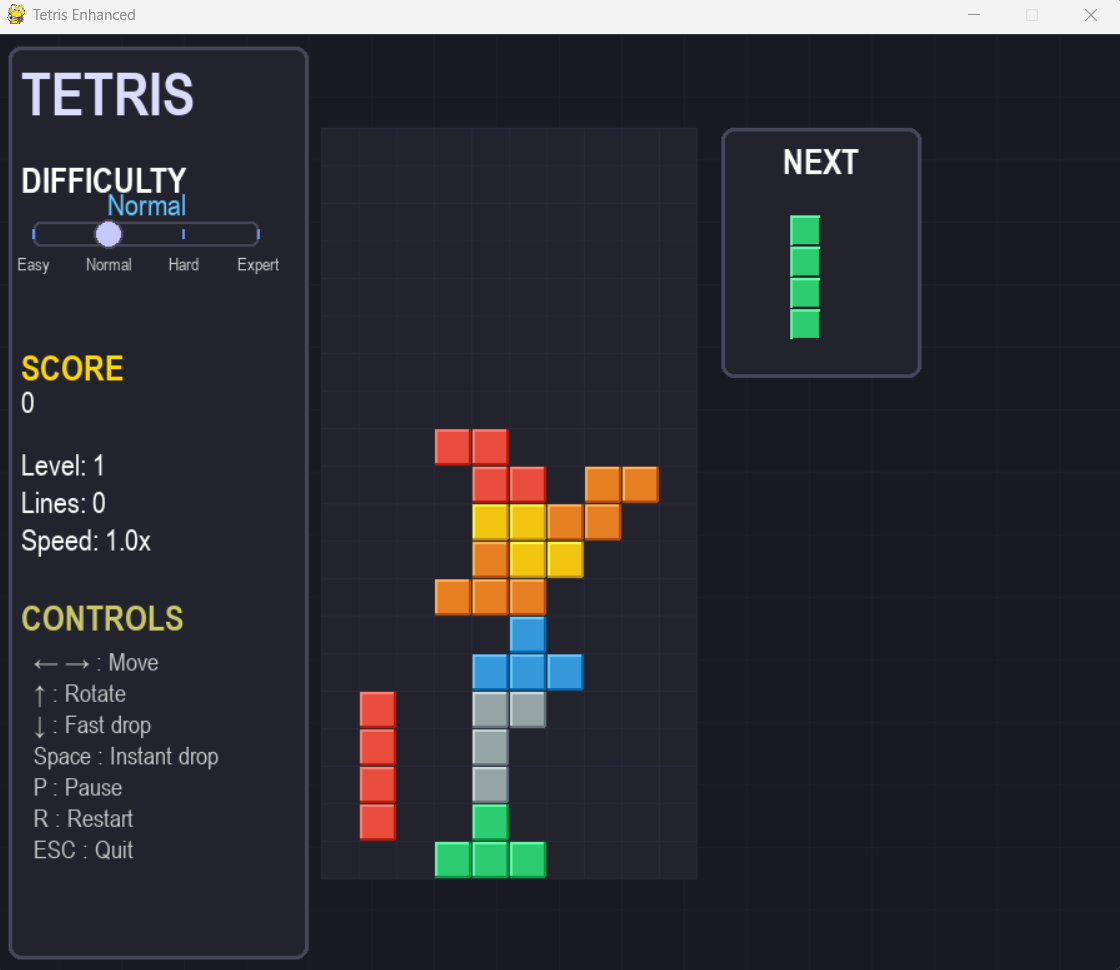
بازی تتریس یکی از کلاسیکترین و محبوبترین بازیهای ویدیویی است که در این
پروژه با پایتون و کتابخانه Pygame پیادهسازی شده است. این
نسخه شامل ویژگیهای پیشرفتهای مانند سیستم انتخاب سطح دشواری با اسلایدر،
رابط کاربری مدرن، نمایش قطعه بعدی، سیستم امتیازدهی پیشرفته و انیمیشنهای
زیبا است.
نصب و پیشنیازها
برای اجرای این پروژه نیاز به پایتون نسخه 3.6 یا بالاتر دارید. کتابخانه Pygame باید نصب شود:
pygame- برای ایجاد رابط گرافیکی و مدیریت بازیrandom- برای تولید قطعات تصادفیsys- برای مدیریت خروج از برنامه
برای نصب Pygame از دستور زیر استفاده کنید:
pip install pygameمعماری بازی
ساختار اصلی بازی شامل کلاسهای زیر است:
- کلاس
Figure- مدیریت قطعات تتریس - کلاس
Tetris- منطق اصلی بازی - کلاس
DifficultySlider- اسلایدر تنظیم سختی - کلاس
TetrisGame- مدیریت اصلی بازی و رابط کاربری - توابع کمکی برای مدیریت رنگها و انیمیشنها
ویژگیهای اصلی
این بازی تتریس دارای قابلیتهای متعددی است:
- اسلایدر تنظیم سطح دشواری (آسان، معمولی، سخت، خبره)
- نمایش قطعه بعدی در پنل مجزا
- سیستم امتیازدهی پیشرفته با ضریب سطح
- رابط کاربری مدرن با تم تیره
- صفحه پایش امتیازات و آمار
- قابلیت توقف و ادامه بازی
- انیمیشنهای زیبا برای قطعات
- سیستم تشخیص برخورد و چرخش
- صفحه Game Over با امتیاز نهایی
کدنویسی پروژه
کد کامل پروژه
import pygame
import random
import sys
# Initialize Pygame
pygame.init()
# Colors
BLACK = (0, 0, 0)
WHITE = (255, 255, 255)
GRAY = (64, 64, 64)
BACKGROUND = (25, 25, 35)
GRID_COLOR = (40, 40, 55)
UI_BACKGROUND = (35, 35, 45)
UI_BORDER = (70, 70, 90)
SLIDER_COLOR = (100, 150, 255)
SLIDER_HANDLE = (200, 200, 255)
# Tetromino colors
COLORS = [
BLACK,
(142, 68, 173), # Purple
(52, 152, 219), # Blue
(46, 204, 113), # Green
(241, 196, 15), # Yellow
(230, 126, 34), # Orange
(231, 76, 60), # Red
(149, 165, 166) # Silver
]
# Helper function for color gradients
def adjust_color(color, adjustment):
r, g, b = color
r = max(0, min(255, r + adjustment))
g = max(0, min(255, g + adjustment))
b = max(0, min(255, b + adjustment))
return (r, g, b)
class Figure:
figures = [
[[1, 5, 9, 13], [4, 5, 6, 7]], # I
[[4, 5, 9, 10], [2, 6, 5, 9]], # Z
[[6, 7, 9, 10], [1, 5, 6, 10]], # S
[[1, 2, 5, 9], [0, 4, 5, 6], [1, 5, 9, 8], [4, 5, 6, 10]], # J
[[1, 2, 6, 10], [5, 6, 7, 9], [2, 6, 10, 11], [3, 5, 6, 7]], # L
[[1, 4, 5, 6], [1, 4, 5, 9], [4, 5, 6, 9], [1, 5, 6, 9]], # T
[[1, 2, 5, 6]], # O
]
def __init__(self, x, y):
self.x = x
self.y = y
self.type = random.randint(0, len(self.figures) - 1)
self.color_idx = random.randint(1, len(COLORS) - 1)
self.rotation = 0
def image(self):
return self.figures[self.type][self.rotation]
def rotate(self):
self.rotation = (self.rotation + 1) % len(self.figures[self.type])
class Tetris:
def __init__(self, height, width, difficulty_level=1):
self.height = height
self.width = width
self.difficulty_level = difficulty_level
self.reset()
def reset(self):
self.field = [[0 for _ in range(self.width)] for _ in range(self.height)]
self.score = 0
self.lines_cleared = 0
self.level = 1
self.state = "start"
self.next_piece = None
# Set speed based on difficulty level (1-4)
difficulty_speeds = {1: 1.5, 2: 1.0, 3: 0.7, 4: 0.4}
self.base_speed = difficulty_speeds.get(self.difficulty_level, 1.0)
self.drop_speed = self.base_speed
self.game_start_time = pygame.time.get_ticks()
self.last_drop_time = pygame.time.get_ticks()
self.new_figure()
self.generate_next_piece()
def new_figure(self):
if self.next_piece:
self.figure = self.next_piece
self.figure.x = self.width // 2 - 2
self.figure.y = 0
self.generate_next_piece()
else:
self.figure = Figure(self.width // 2 - 2, 0)
self.generate_next_piece()
def generate_next_piece(self):
self.next_piece = Figure(self.width // 2 - 2, 0)
def intersects_at(self, x, y):
for i in range(4):
for j in range(4):
if i * 4 + j in self.figure.image():
if (i + y > self.height - 1 or
j + x > self.width - 1 or
j + x < 0 or
(i + y >= 0 and self.field[i + y][j + x] > 0)):
return True
return False
def intersects(self):
return self.intersects_at(self.figure.x, self.figure.y)
def break_lines(self):
lines = 0
for i in range(self.height):
if all(self.field[i]):
lines += 1
for i1 in range(i, 0, -1):
for j in range(self.width):
self.field[i1][j] = self.field[i1 - 1][j]
for j in range(self.width):
self.field[0][j] = 0
if lines > 0:
line_scores = {1: 100, 2: 300, 3: 500, 4: 800}
self.score += line_scores.get(lines, 0) * self.level
self.lines_cleared += lines
self.level = self.lines_cleared // 10 + 1
# Speed increases with level (faster = lower drop_speed)
self.drop_speed = max(0.05, self.base_speed - (self.level - 1) * 0.1)
return lines
def should_drop(self):
current_time = pygame.time.get_ticks()
return current_time - self.last_drop_time > self.drop_speed * 1000
def update_drop_timer(self):
self.last_drop_time = pygame.time.get_ticks()
def go_space(self):
while not self.intersects_at(self.figure.x, self.figure.y + 1):
self.figure.y += 1
self.freeze()
def go_down(self):
self.figure.y += 1
if self.intersects():
self.figure.y -= 1
self.freeze()
def freeze(self):
for i in range(4):
for j in range(4):
if i * 4 + j in self.figure.image():
if self.figure.y + i >= 0:
self.field[self.figure.y + i][self.figure.x + j] = self.figure.color_idx
self.break_lines()
self.new_figure()
self.update_drop_timer()
if self.intersects():
self.state = "gameover"
def go_side(self, dx):
old_x = self.figure.x
self.figure.x += dx
if self.intersects():
self.figure.x = old_x
def rotate(self):
old_rotation = self.figure.rotation
self.figure.rotate()
if self.intersects():
self.figure.rotation = old_rotation
class DifficultySlider:
def __init__(self, x, y, width, height):
self.rect = pygame.Rect(x, y, width, height)
self.handle_radius = 12
self.min_value = 1
self.max_value = 4
self.value = 2 # Start at Normal (2)
self.dragging = False
# Difficulty labels
self.difficulty_names = ["Easy", "Normal", "Hard", "Expert"]
self.difficulty_colors = [
(100, 255, 100), # Easy - Green
(100, 200, 255), # Normal - Blue
(255, 200, 100), # Hard - Orange
(255, 100, 100) # Expert - Red
]
def get_handle_x(self):
# Calculate handle position based on value
value_range = self.max_value - self.min_value
position = (self.value - self.min_value) / value_range
return self.rect.x + position * self.rect.width
def set_value_from_pos(self, x):
# Convert x position to value
relative_x = max(0, min(self.rect.width, x - self.rect.x))
value_range = self.max_value - self.min_value
self.value = self.min_value + (relative_x / self.rect.width) * value_range
self.value = round(self.value) # Snap to integer values
def handle_event(self, event):
if event.type == pygame.MOUSEBUTTONDOWN:
if event.button == 1:
# Check if click is on handle
handle_x = self.get_handle_x()
handle_rect = pygame.Rect(
handle_x - self.handle_radius,
self.rect.centery - self.handle_radius,
self.handle_radius * 2,
self.handle_radius * 2
)
if handle_rect.collidepoint(event.pos):
self.dragging = True
# Check if click is on slider track
elif self.rect.collidepoint(event.pos):
self.set_value_from_pos(event.pos[0])
self.dragging = True
return True # Value changed
elif event.type == pygame.MOUSEBUTTONUP:
if event.button == 1 and self.dragging:
self.dragging = False
return True # Value changed
elif event.type == pygame.MOUSEMOTION:
if self.dragging:
self.set_value_from_pos(event.pos[0])
return True # Value changed
return False
def draw(self, screen, font):
# Draw slider track
pygame.draw.rect(screen, UI_BACKGROUND, self.rect, border_radius=5)
pygame.draw.rect(screen, UI_BORDER, self.rect, 2, border_radius=5)
# Draw difficulty markers
marker_height = 8
for i in range(self.min_value, self.max_value + 1):
marker_x = self.rect.x + ((i - self.min_value) / (self.max_value - self.min_value)) * self.rect.width
pygame.draw.rect(screen, SLIDER_COLOR,
(marker_x - 1, self.rect.y + (self.rect.height - marker_height) // 2,
2, marker_height))
# Draw slider handle
handle_x = self.get_handle_x()
pygame.draw.circle(screen, SLIDER_HANDLE,
(int(handle_x), self.rect.centery),
self.handle_radius)
pygame.draw.circle(screen, UI_BORDER,
(int(handle_x), self.rect.centery),
self.handle_radius, 2)
# Draw current difficulty name ABOVE the slider
difficulty_index = int(self.value) - 1
if 0 <= difficulty_index < len(self.difficulty_names):
difficulty_text = font.render(self.difficulty_names[difficulty_index], True,
self.difficulty_colors[difficulty_index])
# Position ABOVE the slider (not below)
screen.blit(difficulty_text,
(self.rect.centerx - difficulty_text.get_width() // 2,
self.rect.y - 28)) # Position above slider
# Draw difficulty labels BELOW the slider
small_font = pygame.font.SysFont('Arial', 14)
for i, name in enumerate(self.difficulty_names):
label_x = self.rect.x + (i / (len(self.difficulty_names) - 1)) * self.rect.width
label_text = small_font.render(name, True, (200, 200, 200))
# Labels at the bottom
screen.blit(label_text,
(label_x - label_text.get_width() // 2,
self.rect.bottom + 5)) # Just below slider
class TetrisGame:
def __init__(self):
self.screen_width = 900
self.screen_height = 750 # Increased height for slider
self.screen = pygame.display.set_mode((self.screen_width, self.screen_height))
pygame.display.set_caption("Tetris Enhanced")
# Game area positioning
self.cell_size = 30
self.game_width = 10
self.game_height = 20
# Calculate game area dimensions
total_game_width = self.game_width * self.cell_size
total_game_height = self.game_height * self.cell_size
# Fixed panel widths
self.left_panel_width = 240
self.right_panel_width = 160
# Center game area between panels
self.game_area_x = self.left_panel_width + 20
self.game_area_y = (self.screen_height - total_game_height) // 2
# Right panel position
self.right_panel_x = self.game_area_x + total_game_width + 20
# Check if everything fits
total_width_needed = self.left_panel_width + total_game_width + self.right_panel_width + 40
if total_width_needed > self.screen_width:
# Scale down if needed
scale_factor = self.screen_width / total_width_needed
self.cell_size = int(self.cell_size * scale_factor)
total_game_width = self.game_width * self.cell_size
total_game_height = self.game_height * self.cell_size
self.right_panel_width = int(self.right_panel_width * scale_factor)
self.game_area_x = self.left_panel_width + 20
self.right_panel_x = self.game_area_x + total_game_width + 20
# Initialize game with default difficulty (Normal = level 2)
self.difficulty_level = 2
self.game = Tetris(self.game_height, self.game_width, self.difficulty_level)
# Initialize difficulty slider - position it LOWER
slider_x = 30
slider_y = 150 # Increased from 140 to 150
self.slider = DifficultySlider(slider_x, slider_y, 180, 20)
# Game state
self.clock = pygame.time.Clock()
self.fps = 60
self.counter = 0
self.pressing_down = False
self.paused = False
# Fonts
self.title_font = pygame.font.SysFont('Arial', 48, bold=True)
self.header_font = pygame.font.SysFont('Arial', 28, bold=True)
self.normal_font = pygame.font.SysFont('Arial', 24)
self.small_font = pygame.font.SysFont('Arial', 20)
self.tiny_font = pygame.font.SysFont('Arial', 14)
def restart_with_difficulty(self, difficulty_level):
"""Restart the game with a new difficulty level"""
self.difficulty_level = difficulty_level
self.game = Tetris(self.game_height, self.game_width, self.difficulty_level)
self.paused = False
def draw_background(self):
self.screen.fill(BACKGROUND)
# Draw subtle grid pattern
for x in range(0, self.screen_width, 50):
pygame.draw.line(self.screen, (30, 30, 40), (x, 0), (x, self.screen_height), 1)
for y in range(0, self.screen_height, 50):
pygame.draw.line(self.screen, (30, 30, 40), (0, y), (self.screen_width, y), 1)
def draw_game_area(self):
# Game area background
area_width = self.game_width * self.cell_size
area_height = self.game_height * self.cell_size
pygame.draw.rect(self.screen, UI_BACKGROUND,
(self.game_area_x, self.game_area_y, area_width, area_height))
# Draw grid
for i in range(self.game_height + 1):
y = self.game_area_y + i * self.cell_size
pygame.draw.line(self.screen, GRID_COLOR,
(self.game_area_x, y),
(self.game_area_x + area_width, y))
for j in range(self.game_width + 1):
x = self.game_area_x + j * self.cell_size
pygame.draw.line(self.screen, GRID_COLOR,
(x, self.game_area_y),
(x, self.game_area_y + area_height))
# Draw placed blocks
for i in range(self.game_height):
for j in range(self.game_width):
if self.game.field[i][j] > 0:
color = COLORS[self.game.field[i][j]]
x = self.game_area_x + j * self.cell_size
y = self.game_area_y + i * self.cell_size
# Main block
pygame.draw.rect(self.screen, color,
(x + 1, y + 1, self.cell_size - 2, self.cell_size - 2))
# Simple highlight
pygame.draw.line(self.screen, adjust_color(color, 50),
(x + 1, y + 1), (x + self.cell_size - 2, y + 1), 2)
pygame.draw.line(self.screen, adjust_color(color, 50),
(x + 1, y + 1), (x + 1, y + self.cell_size - 2), 2)
# Simple shadow
pygame.draw.line(self.screen, adjust_color(color, -50),
(x + 1, y + self.cell_size - 2),
(x + self.cell_size - 2, y + self.cell_size - 2), 2)
pygame.draw.line(self.screen, adjust_color(color, -50),
(x + self.cell_size - 2, y + 1),
(x + self.cell_size - 2, y + self.cell_size - 2), 2)
# Draw current piece
if self.game.figure:
for i in range(4):
for j in range(4):
p = i * 4 + j
if p in self.game.figure.image():
x = self.game_area_x + (j + self.game.figure.x) * self.cell_size
y = self.game_area_y + (i + self.game.figure.y) * self.cell_size
color = COLORS[self.game.figure.color_idx]
# Main block
pygame.draw.rect(self.screen, color,
(x + 1, y + 1, self.cell_size - 2, self.cell_size - 2))
# Highlight
pygame.draw.line(self.screen, adjust_color(color, 50),
(x + 1, y + 1), (x + self.cell_size - 2, y + 1), 2)
pygame.draw.line(self.screen, adjust_color(color, 50),
(x + 1, y + 1), (x + 1, y + self.cell_size - 2), 2)
# Shadow
pygame.draw.line(self.screen, adjust_color(color, -50),
(x + 1, y + self.cell_size - 2),
(x + self.cell_size - 2, y + self.cell_size - 2), 2)
pygame.draw.line(self.screen, adjust_color(color, -50),
(x + self.cell_size - 2, y + 1),
(x + self.cell_size - 2, y + self.cell_size - 2), 2)
def draw_left_panel(self):
# Left panel background
panel_width = self.left_panel_width
pygame.draw.rect(self.screen, UI_BACKGROUND, (10, 10, panel_width, 730), border_radius=10)
pygame.draw.rect(self.screen, UI_BORDER, (10, 10, panel_width, 730), 3, border_radius=10)
# Title
title = self.title_font.render("TETRIS", True, (220, 220, 255))
self.screen.blit(title, (20, 20))
# Current difficulty display - moved down
diff_text = self.header_font.render("DIFFICULTY", True, WHITE)
self.screen.blit(diff_text, (20, 100)) # Plenty of space above slider
# Draw the slider - now with the current difficulty name ABOVE it
self.slider.draw(self.screen, self.normal_font)
# Score - moved further down
score_text = self.header_font.render("SCORE", True, (255, 215, 0))
self.screen.blit(score_text, (20, 250)) # Increased spacing
score_value = self.normal_font.render(f"{self.game.score:,}", True, WHITE)
self.screen.blit(score_value, (20, 280))
# Level and Lines - adjusted spacing
level_text = self.normal_font.render(f"Level: {self.game.level}", True, WHITE)
self.screen.blit(level_text, (20, 330))
lines_text = self.normal_font.render(f"Lines: {self.game.lines_cleared}", True, WHITE)
self.screen.blit(lines_text, (20, 360))
# Speed indicator
speed_text = self.normal_font.render(f"Speed: {1/self.game.drop_speed:.1f}x", True, WHITE)
self.screen.blit(speed_text, (20, 390))
# Controls - moved down
controls_y = 450
controls_title = self.header_font.render("CONTROLS", True, (200, 200, 100))
self.screen.blit(controls_title, (20, controls_y))
controls = [
"← → : Move",
"↑ : Rotate",
"↓ : Fast drop",
"Space : Instant drop",
"P : Pause",
"R : Restart",
"ESC : Quit"
]
for i, text in enumerate(controls):
control_text = self.small_font.render(text, True, (200, 200, 200))
self.screen.blit(control_text, (30, controls_y + 40 + i * 25))
def draw_right_panel(self):
# Right panel for next piece
panel_width = self.right_panel_width
panel_height = 200
pygame.draw.rect(self.screen, UI_BACKGROUND,
(self.right_panel_x, self.game_area_y, panel_width, panel_height),
border_radius=10)
pygame.draw.rect(self.screen, UI_BORDER,
(self.right_panel_x, self.game_area_y, panel_width, panel_height),
3, border_radius=10)
# "Next" title
next_text = self.header_font.render("NEXT", True, WHITE)
self.screen.blit(next_text, (self.right_panel_x + (panel_width - next_text.get_width()) // 2,
self.game_area_y + 10))
# Draw next piece
if self.game.next_piece:
piece_size = min(25, (panel_width - 40) // 4) # Scale piece size if needed
# Center the piece in the panel
offset_x = self.right_panel_x + (panel_width - piece_size * 4) // 2
offset_y = self.game_area_y + 70
for i in range(4):
for j in range(4):
p = i * 4 + j
if p in self.game.next_piece.image():
x = offset_x + j * piece_size
y = offset_y + i * piece_size
color = COLORS[self.game.next_piece.color_idx]
pygame.draw.rect(self.screen, color,
(x, y, piece_size - 2, piece_size - 2))
# Simple highlight
pygame.draw.line(self.screen, adjust_color(color, 50),
(x, y), (x + piece_size - 2, y), 2)
pygame.draw.line(self.screen, adjust_color(color, 50),
(x, y), (x, y + piece_size - 2), 2)
def draw_game_over(self):
if self.game.state == "gameover":
# Semi-transparent overlay
overlay = pygame.Surface((self.screen_width, self.screen_height), pygame.SRCALPHA)
overlay.fill((0, 0, 0, 180))
self.screen.blit(overlay, (0, 0))
# Game over box
box_width = 400
box_height = 200
box_x = (self.screen_width - box_width) // 2
box_y = (self.screen_height - box_height) // 2
pygame.draw.rect(self.screen, UI_BACKGROUND,
(box_x, box_y, box_width, box_height), border_radius=15)
pygame.draw.rect(self.screen, (200, 50, 50),
(box_x, box_y, box_width, box_height), 3, border_radius=15)
# Game over text
game_over_font = pygame.font.SysFont('Arial', 48, bold=True)
game_over_text = game_over_font.render("GAME OVER", True, (255, 100, 100))
self.screen.blit(game_over_text,
(self.screen_width // 2 - game_over_text.get_width() // 2,
box_y + 30))
# Final score
score_font = pygame.font.SysFont('Arial', 32)
score_text = score_font.render(f"Final Score: {self.game.score:,}", True, WHITE)
self.screen.blit(score_text,
(self.screen_width // 2 - score_text.get_width() // 2,
box_y + 100))
# Instructions
instruct_font = pygame.font.SysFont('Arial', 24)
instruct_text = instruct_font.render("Press R to restart", True, (200, 200, 100))
self.screen.blit(instruct_text,
(self.screen_width // 2 - instruct_text.get_width() // 2,
box_y + 150))
def draw_pause_screen(self):
if self.paused:
# Semi-transparent overlay
overlay = pygame.Surface((self.screen_width, self.screen_height), pygame.SRCALPHA)
overlay.fill((0, 0, 0, 150))
self.screen.blit(overlay, (0, 0))
# Pause box
box_width = 400
box_height = 150
box_x = (self.screen_width - box_width) // 2
box_y = (self.screen_height - box_height) // 2
pygame.draw.rect(self.screen, UI_BACKGROUND,
(box_x, box_y, box_width, box_height), border_radius=15)
pygame.draw.rect(self.screen, (100, 150, 255),
(box_x, box_y, box_width, box_height), 3, border_radius=15)
# Pause text
pause_font = pygame.font.SysFont('Arial', 48, bold=True)
pause_text = pause_font.render("PAUSED", True, (100, 200, 255))
self.screen.blit(pause_text,
(self.screen_width // 2 - pause_text.get_width() // 2,
box_y + 30))
# Instructions
instruct_font = pygame.font.SysFont('Arial', 24)
instruct_text = instruct_font.render("Press P to resume", True, WHITE)
self.screen.blit(instruct_text,
(self.screen_width // 2 - instruct_text.get_width() // 2,
box_y + 100))
def run(self):
running = True
while running:
# Handle events
for event in pygame.event.get():
if event.type == pygame.QUIT:
running = False
# Handle slider events
if self.slider.handle_event(event):
# If slider value changed, restart game with new difficulty
if int(self.slider.value) != self.difficulty_level:
self.restart_with_difficulty(int(self.slider.value))
if event.type == pygame.KEYDOWN:
if event.key == pygame.K_ESCAPE:
running = False
if event.key == pygame.K_r:
self.restart_with_difficulty(int(self.slider.value))
if event.key == pygame.K_p:
self.paused = not self.paused
if not self.paused and self.game.state == "start":
if event.key == pygame.K_UP:
self.game.rotate()
if event.key == pygame.K_DOWN:
self.pressing_down = True
if event.key == pygame.K_LEFT:
self.game.go_side(-1)
if event.key == pygame.K_RIGHT:
self.game.go_side(1)
if event.key == pygame.K_SPACE:
self.game.go_space()
if event.type == pygame.KEYUP:
if event.key == pygame.K_DOWN:
self.pressing_down = False
# Update game logic if not paused
if not self.paused and self.game.state == "start":
# Automatic drop based on time
if self.game.should_drop():
self.game.go_down()
self.game.update_drop_timer()
# Manual fast drop
if self.pressing_down:
self.game.go_down()
# Draw everything
self.draw_background()
self.draw_left_panel()
self.draw_game_area()
self.draw_right_panel()
# Draw game over/pause screens
if self.game.state == "gameover":
self.draw_game_over()
elif self.paused:
self.draw_pause_screen()
pygame.display.flip()
self.clock.tick(self.fps)
pygame.quit()
sys.exit()
if __name__ == "__main__":
game = TetrisGame()
game.run()توضیح بخشهای مهم کد
۱. کلاس Figure - مدیریت قطعات تتریس
این کلاس مسئول ایجاد و مدیریت قطعات مختلف تتریس است:
class Figure:
figures = [
    [[1, 5, 9, 13], [4, 5, 6, 7]],  # I
    [[4, 5, 9, 10], [2, 6, 5, 9]],  # Z
    [[6, 7, 9, 10], [1, 5, 6, 10]], # S
    [[1, 2, 5, 9], [0, 4, 5, 6], [1, 5, 9, 8], [4, 5, 6, 10]], # J
    [[1, 2, 6, 10], [5, 6, 7, 9], [2, 6, 10, 11], [3, 5, 6, 7]], # L
    [[1, 4, 5, 6], [1, 4, 5, 9], [4, 5, 6, 9], [1, 5, 6, 9]], # T
    [[1, 2, 5, 6]], # O
]

def __init__(self, x, y):
    self.x = x
    self.y = y
    self.type = random.randint(0, len(self.figures) - 1)
    self.color_idx = random.randint(1, len(COLORS) - 1)
    self.rotation = 0

def image(self):
    return self.figures[self.type][self.rotation]

def rotate(self):
    self.rotation = (self.rotation + 1) % len(self.figures[self.type])
توضیح: این کلاس با استفاده از ماتریسهای 4x4 و اندیسهای مشخص، اشکال مختلف تتریس را تعریف میکند. هر شکل میتواند چندین حالت چرخش داشته باشد و به صورت تصادفی با رنگهای مختلف تولید میشود.
۲. کلاس Tetris - منطق اصلی بازی
این کلاس مسئولیت مدیریت منطق بازی، برخوردها، امتیازدهی و وضعیت بازی را بر عهده دارد:
class Tetris:
def __init__(self, height, width, difficulty_level=1):
    self.height = height
    self.width = width
    self.difficulty_level = difficulty_level
    self.reset()

def break_lines(self):
    lines = 0
    for i in range(self.height):
        if all(self.field[i]):  # اگر یک سطر کاملاً پر باشد
            lines += 1
            # جابجایی سطرهای بالا به پایین
            for i1 in range(i, 0, -1):
                for j in range(self.width):
                    self.field[i1][j] = self.field[i1 - 1][j]
            # خالی کردن سطر بالا
            for j in range(self.width):
                self.field[0][j] = 0

    if lines > 0:
        line_scores = {1: 100, 2: 300, 3: 500, 4: 800}
        self.score += line_scores.get(lines, 0) * self.level
        self.lines_cleared += lines
        self.level = self.lines_cleared // 10 + 1
        # افزایش سرعت با افزایش سطح
        self.drop_speed = max(0.05, self.base_speed - (self.level - 1) * 0.1)

    return lines
توضیح: این کلاس با استفاده از یک ماتریس دو بعدی وضعیت
بازی را مدیریت میکند. تابع break_lines سطرهای کامل را
شناسایی کرده، حذف میکند و امتیاز محاسبه میکند. همچنین با افزایش سطح،
سرعت بازی بیشتر میشود.
۳. کلاس DifficultySlider - کنترل سطح سختی
این کلاس یک اسلایدر گرافیکی برای تنظیم سطح دشواری بازی ایجاد میکند:
class DifficultySlider:
def __init__(self, x, y, width, height):
self.rect = pygame.Rect(x, y, width, height)
self.handle_radius = 12
self.min_value = 1
self.max_value = 4
self.value = 2 # شروع از سطح Normal (2)
# برچسبهای سطح دشواری
self.difficulty_names = ["Easy", "Normal", "Hard", "Expert"]
self.difficulty_colors = [
(100, 255, 100), # آسان - سبز
(100, 200, 255), # معمولی - آبی
(255, 200, 100), # سخت - نارنجی
(255, 100, 100) # خبره - قرمز
]
def handle_event(self, event):
if event.type == pygame.MOUSEBUTTONDOWN:
if event.button == 1:
# بررسی کلیک روی هندل اسلایدر
handle_x = self.get_handle_x()
handle_rect = pygame.Rect(
handle_x - self.handle_radius,
self.rect.centery - self.handle_radius,
self.handle_radius * 2,
self.handle_radius * 2
)
if handle_rect.collidepoint(event.pos):
self.dragging = True
# بررسی کلیک روی track اسلایدر
elif self.rect.collidepoint(event.pos):
self.set_value_from_pos(event.pos[0])
self.dragging = True
return True # مقدار تغییر کردتوضیح: این کلاس با استفاده از هندلینگ رویدادهای ماوس، یک اسلایدر تعاملی ایجاد میکند که کاربر میتواند سطح دشواری بازی را بین ۴ حالت مختلف تنظیم کند. هر سطح دارای رنگ و برچسب مخصوص به خود است.
۴. کلاس TetrisGame - مدیریت رابط کاربری
این کلاس اصلیترین بخش بازی است که تمام بخشها را به هم متصل میکند:
class TetrisGame:
def __init__(self):
self.screen_width = 900
self.screen_height = 750
self.screen = pygame.display.set_mode((self.screen_width, self.screen_height))
pygame.display.set_caption("Tetris Enhanced")
# تنظیمات صفحه بازی
self.cell_size = 30
self.game_width = 10
self.game_height = 20
# موقعیتیابی اجزای رابط کاربری
self.left_panel_width = 240
self.right_panel_width = 160
self.game_area_x = self.left_panel_width + 20
self.game_area_y = (self.screen_height - total_game_height) // 2
# اسلایدر تنظیم سختی
self.slider = DifficultySlider(slider_x, slider_y, 180, 20)
# وضعیت بازی
self.paused = Falseتوضیح: این کلاس مسئول تنظیم پنجره بازی، موقعیتیابی پنلها، مدیریت حلقه اصلی بازی، هندلینگ رویدادهای صفحهکلید و ماوس، و رندر کردن تمام اجزای گرافیکی است.
۵. سیستم امتیازدهی و سطحبندی
این بخش نحوه محاسبه امتیاز و افزایش سطح را نشان میدهد:
def break_lines(self):
lines = 0
for i in range(self.height):
    if all(self.field[i]):
        lines += 1
        # حذف سطر و جابجایی سطرهای بالا
        for i1 in range(i, 0, -1):
            for j in range(self.width):
                self.field[i1][j] = self.field[i1 - 1][j]
        for j in range(self.width):
            self.field[0][j] = 0

if lines > 0:
    # امتیاز بر اساس تعداد سطرهای پاک شده
    line_scores = {1: 100, 2: 300, 3: 500, 4: 800}
    self.score += line_scores.get(lines, 0) * self.level
    self.lines_cleared += lines
    # افزایش سطح هر ۱۰ خط
    self.level = self.lines_cleared // 10 + 1
    # افزایش سرعت با افزایش سطح
    self.drop_speed = max(0.05, self.base_speed - (self.level - 1) * 0.1)
توضیح: سیستم امتیازدهی بر اساس تعداد سطرهای پاک شده در یک نوبت کار میکند. پاک کردن ۴ سطر همزمان بیشترین امتیاز (۸۰۰) را دارد. هر ۱۰ خط پاک شده، سطح بازی افزایش یافته و سرعت قطعات بیشتر میشود.
نحوه اجرا
برای اجرای بازی مراحل زیر را دنبال کنید:
- مطمئن شوید پایتون نسخه ۳.۶ یا بالاتر نصب شده است
-
کتابخانه Pygame را نصب کنید:
pip install pygame - کد بازی را در فایلی با نام
tetris.pyذخیره کنید -
فایل را اجرا کنید:
python tetris.py
کنترلهای بازی
- فلش چپ/راست: حرکت قطعه به چپ و راست
- فلش بالا: چرخش قطعه
- فلش پایین: سریعتر کردن سقوط قطعه
- Space: سقوط فوری قطعه
- P: توقف/ادامه بازی
- R: شروع مجدد بازی
- ESC: خروج از بازی
- ماوس: تنظیم سطح دشواری با اسلایدر
توسعه و بهبود
ایدههایی برای توسعه بیشتر بازی تتریس:
- افزودن موسیقی متن و افکتهای صوتی
- ایجاد سیستم رکورد و جدول امتیازات برتر
- افزودن حالت بازی دو نفره
- ایجاد انواع جدید قطعات
- افزودن سیستم power-up و آیتمهای ویژه
- ایجاد مراحل مختلف با چالشهای منحصربفرد
- افزودن قابلیت ذخیره بازی
- ایجاد سیستم achievement و نشانها
- افزودن انیمیشنهای پیشرفتهتر
- پشتیبانی از تمهای رنگی مختلف
منابع و مستندات
منابع مفید برای یادگیری بیشتر:
- مستندات رسمی Pygame: https://www.pygame.org/docs/
- آموزش Pygame برای مبتدیان: https://pygame.readthedocs.io/en/latest/1_intro/intro.html
- مستندات رسمی پایتون: https://docs.python.org/3/
- آموزشهای بازیسازی با پایتون: https://realpython.com/pygame-a-primer/
- کدهای نمونه Pygame: https://github.com/pygame/pygame/tree/main/examples
خلاصه پروژه
این پروژه یک پیادهسازی کامل و پیشرفته از بازی کلاسیک تتریس با پایتون و Pygame است. ویژگیهای برجسته این پروژه شامل:
- پیادهسازی کامل منطق بازی تتریس با تمام قواعد اصلی
- رابط کاربری مدرن با تم تیره و رنگبندی جذاب
- سیستم اسلایدر برای تنظیم سطح دشواری (۴ سطح مختلف)
- نمایش قطعه بعدی در پنل مجزا
- سیستم امتیازدهی پیشرفته با ضریب سطح
- مدیریت کامل وضعیت بازی (شروع، توقف، بازی تمام)
- صفحه Game Over با امتیاز ناهی
- کنترلهای کامل صفحهکلید و ماوس
- انیمیشنهای زیبا برای قطعات و هایلایت
- طراحی ماژولار و قابل توسعه
این پروژه نمونهای عالی از ترکیب برنامهنویسی شیگرا، مدیریت رویدادها، طراحی رابط کاربری گرافیکی و الگوریتمهای بازی در پایتون است.